If your discount code is rejected or the price doesn't change, it's almost always one of these four things.
1. A hidden space in the code
Copying a code often adds an invisible space. Type the code by hand instead of pasting it.
2. The wrong ticket
Discount codes only work on the Reduced ticket. If you chose another ticket, the code is rejected.
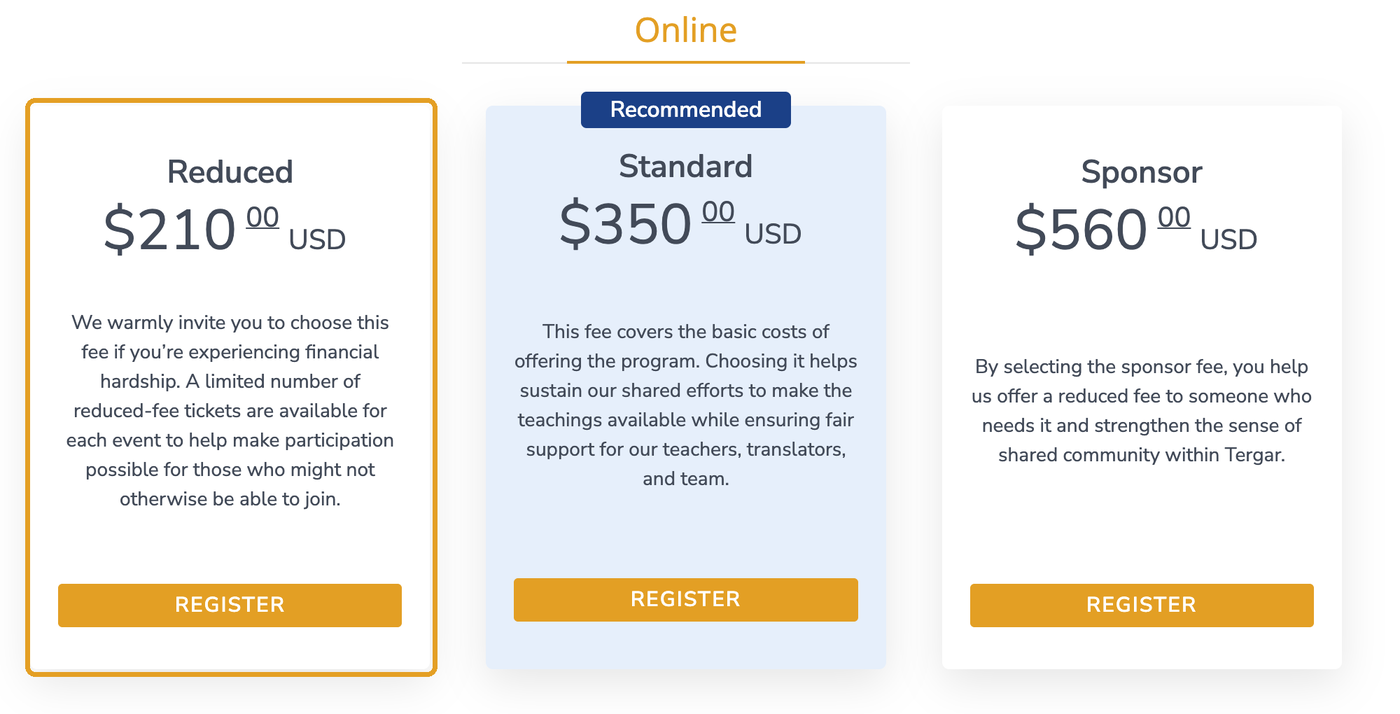
3. The arrow wasn't clicked
After typing the code, click the arrow to the right of the box to apply it.
4. The letter O instead of zero
Any "0" in a code is the number zero, not the letter O.
How to apply a code
- Log in at events.tergar.org and open the event.
- Scroll down and click Register under the Reduced ticket.
- In the gray pop-up window, click Apply coupon.
- Type the code and click the arrow.
- Check that the price changes. If it doesn't change, stop and go back through the four checks above before paying.
- Add your payment method if needed, agree to the terms and click Subscribe.
Still not working?
Submit a ticket with the event name and a screenshot of the checkout window.
Related articles
Still have questions? Submit a ticket and our team will be happy to help.
Was this article helpful?
That’s Great!
Thank you for your feedback
Sorry! We couldn't be helpful
Thank you for your feedback
Feedback sent
We appreciate your effort and will try to fix the article